HyperKYC SDKs
The HyperKYC SDKs help you embed workflows directly into your mobile or web applications.
Overview
What does the SDK do?
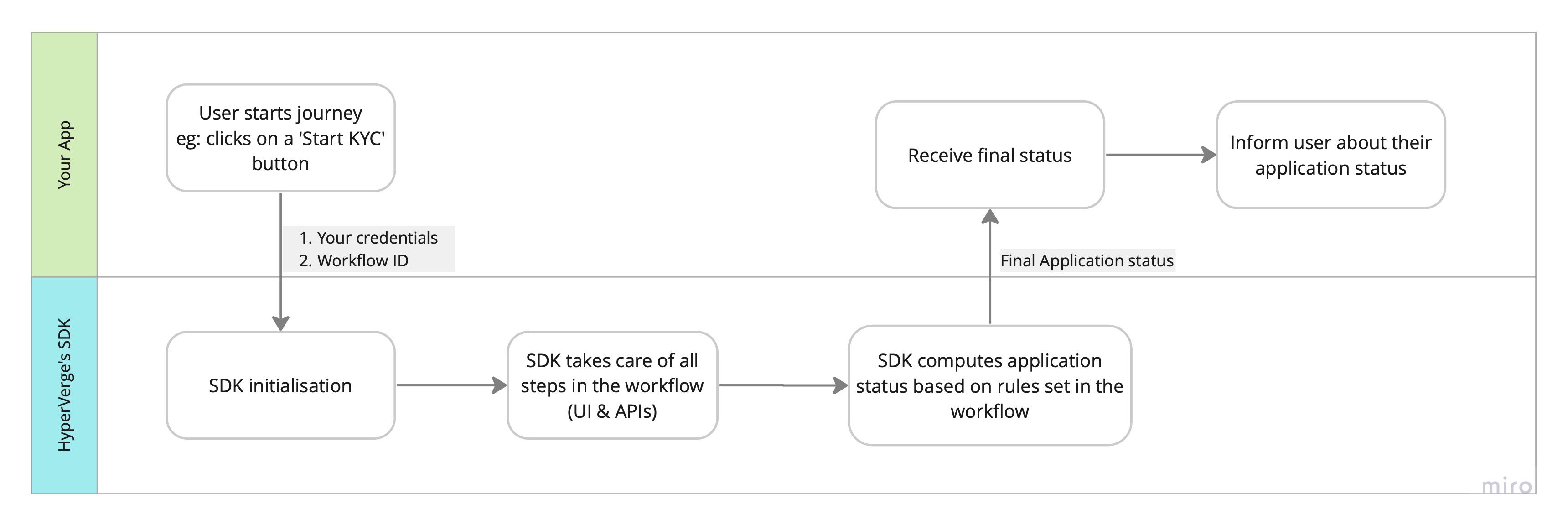
Each SDK allows you to launch and manage a HyperVerge One Workflow end-to-end within your app. Once the user completes the journey, the SDK returns the final application result (approved, declined, dropped off, manual review or error) to your app.
How does it work?
- Pass the Workflow ID: Provide the
workflow_idof the workflow you wish to run. You can find this in your HyperVerge One Dashboard. - SDK Executes the Workflow: The SDK handles all workflow steps automatically, including user interactions, API calls, rules, and logic.
- Receive Application Status: When the workflow is complete, the SDK sends the final application status to your app.
- Handle User Experience: Your app can then display the result to the user or trigger follow-up actions based on the response.
SDK Options
HyperVerge provides five frontend SDKs to suit different platforms. Choose the SDK that fits your tech stack to get started with integration:
Best Practices
Follow these best practices to ensure a secure, performant, and reliable integration across all SDKs:
- Use server-side authentication: Always generate temporary authentication tokens from your backend; never embed raw credentials(AppID/AppKey) in your app.
- Handle permissions proactively: For mobile SDKs, request and validate camera/microphone permissions before launching the SDK (if required by your workflow)
- Stay updated: Integrate the latest SDK version to benefit from new features, security updates, and performance improvements.
- Optimize app size: Include only the required SDK modules; check the respective SDK docs for modular import options.
- Implement robust error handling: Gracefully handle network failures, SDK errors, and user cancellations.
- Whitelist your domain (Web SDK): Add your production domain here to avoid CORS issues.
- Enforce HTTPS: Always use HTTPS endpoints in production environments.
- Prefetch configurations: For faster load times, prefetch SDK configurations as explained in individual SDK documentation.